Tizra Posts > Migrating your Tizra Site to Google Analytics 4
If you use Google Analytics to track how users are interacting with your Tizra site, you're probably aware that since 2023, Google has required that all users be on the current GA4 version of the platform. Fortunately, Tizra has a built-in integration that can be set up in a few minutes.
If you've already got the necessary setup done in Google, all you need to do is paste the Measurement ID (also known as a "Google tag ID") from the appropriate Data Stream into the REPORTING area of the Tizra Admin panel as shown below.
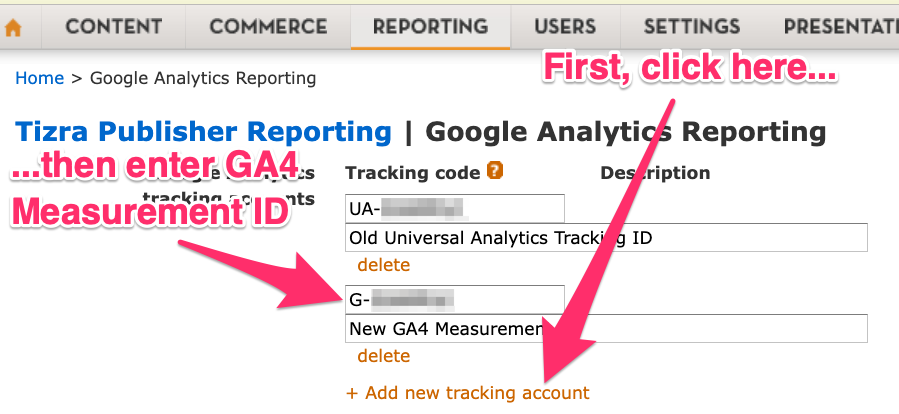
If you don't yet have a Google Analytics 4 property set up, this documentation from Google is a good place to start. When you reach the section titled "Add a data stream," select the "Web" option (rather than "iOS app or Android app"). You'll want to enable "enhanced web measurement" with the default options. When the Data Stream is created, you'll see a Measurement ID as shown below. That's what you'll paste into your Tizra Admin as shown above.

If you're interested in learning about Tizra's built-in reporting tools, which let you track individual users and provide inputs for custom analysis, check out this article.